🔒

This project is password protected

Please enter the password to view this case study.

Form Studio

Redesigning a civic form builder into an operational system municipal teams could configure, publish, and manage with confidence.

DELIVERABLES

Civic SaaS Product

duration

4 weeks

Role

Product Designer

focus

Workflow architecture, publishing & payments

TEAM

Product, Engineering, Implementation

Scope

Workflow architecture, publishing, payments, interaction design

Output

State models, payment framework, approximately 150 high-fidelity screens

Status

Handed off for implementation before public release

overview
Forms are easy to create.
Civic services are harder to run.

Forms Studio helps municipalities build public-facing forms for permits, registrations, payments, and service requests. But as the product grew, a simple publish toggle and linear fee rules were asked to support approvals, schedules, capacity limits, conditional pricing, and audit requirements. The system could technically handle more scenarios, but it became harder for admins to understand what was happening and harder for the team to extend without adding another exception.

I redesigned the product around two explicit models: a service lifecycle and modular fee items. This case study focuses on publishing and payments, where unclear system behaviour created the greatest operational risk.

background
The product could create forms.
Municipalities needed it to run services.

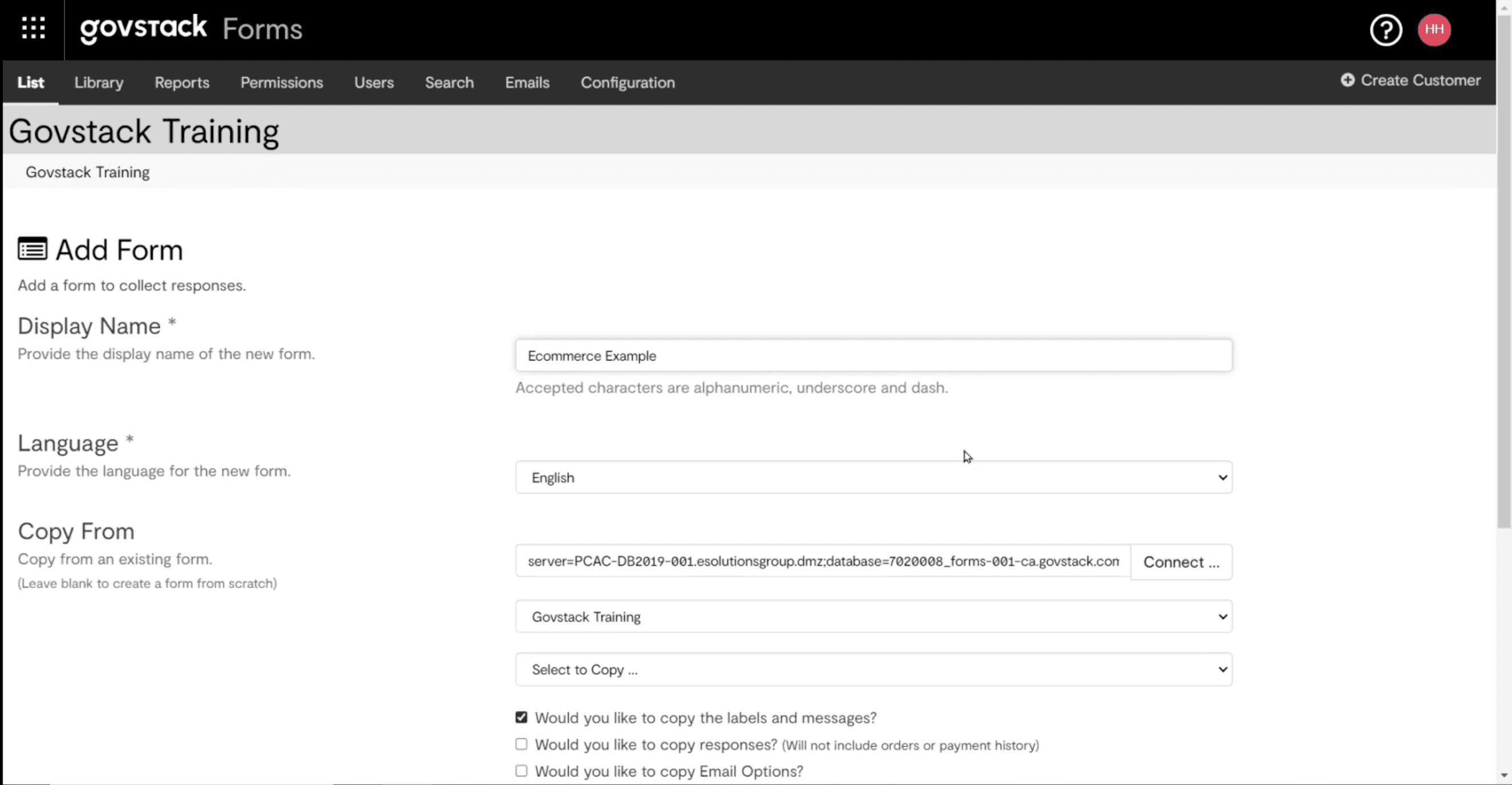
The original product was designed around form creation but we learned that municipal teams needed much more. Internal review, scheduled publishing, restricted access, submission limits, conditional fees, receipts, and reliable ways to recover from mistakes are missing features in our lagacy product. TThese capabilities had been added one by one over time, but the product’s underlying model had not evolved with them. It could support complex service workflows, yet rarely made their states, rules, or consequences clear to the staff responsible for operating them.


That gap surfaced more consequential questions. Is this form actually open to the public? Why is it unavailable? Who can change it? Which rule produced this fee? What happens if someone makes the wrong change? For municipal staff, these were not unusual edge cases. An incorrect state or charge could affect residents, revenue, and public trust.


problem
A form was rarely just a form.

A community hall rental form, for example, might need to open on a future date, charge different rates for residents and businesses, add a late-booking fee, close when capacity is reached, and still remain available to staff afterward.

In the old product, each of these needs was handled as a separate rule or exception. But for municipal staff, they were all part of running the same service. Similar workflows appeared across departments, often shaped by compliance requirements, and the people setting them up were not always experienced software users.

This led to three design requirements:

Shared ownership

Compliance-driven

Risk-averse, not tech-forward

Approach
A form isn't a page. It's a service with a lifecycle.

Before redesigning individual screens, I mapped what could happen to a form from draft to archive. I then reviewed the edge cases with product, engineering, and implementation to understand which were true exceptions and which were recurring parts of municipal work.


01

Create

Build the form

02

Configure

Fees, rules, access

03

Review

Preview & approve

04

Publish

Make available

05

Collect

Responses & payments

06

Close

Resolve or update

07

Retain

Reuse or remove

The service lifecycle became the reference point for every workflow and state decision.

background
The product could create forms.
Municipalities needed it to run services.

The original product was designed around form creation but we learned that municipal teams needed much more. Internal review, scheduled publishing, restricted access, submission limits, conditional fees, receipts, and reliable ways to recover from mistakes are missing features in our lagacy product. TThese capabilities had been added one by one over time, but the product’s underlying model had not evolved with them. It could support complex service workflows, yet rarely made their states, rules, or consequences clear to the staff responsible for operating them.


That gap surfaced more consequential questions. Is this form actually open to the public? Why is it unavailable? Who can change it? Which rule produced this fee? What happens if someone makes the wrong change? For municipal staff, these were not unusual edge cases. An incorrect state or charge could affect residents, revenue, and public trust.


problem
A form was rarely just a form.

A community hall rental form, for example, might need to open on a future date, charge different rates for residents and businesses, add a late-booking fee, close when capacity is reached, and still remain available to staff afterward.

In the old product, each of these needs was handled as a separate rule or exception. But for municipal staff, they were all part of running the same service. Similar workflows appeared across departments, often shaped by compliance requirements, and the people setting them up were not always experienced software users.

This led to three design requirements:

Shared ownership

Compliance-driven

Risk-averse, not tech-forward

Approach
A form isn't a page. It's a service with a lifecycle.

Before redesigning individual screens, I mapped what could happen to a form from draft to archive. I then reviewed the edge cases with product, engineering, and implementation to understand which were true exceptions and which were recurring parts of municipal work.


01

Create

Build the form

02

Configure

Fees, rules, access

03

Review

Preview & approve

04

Publish

Make available

05

Collect

Responses & payments

06

Close

Resolve or update

07

Retain

Reuse or remove

The service lifecycle became the reference point for every workflow and state decision.

design decision
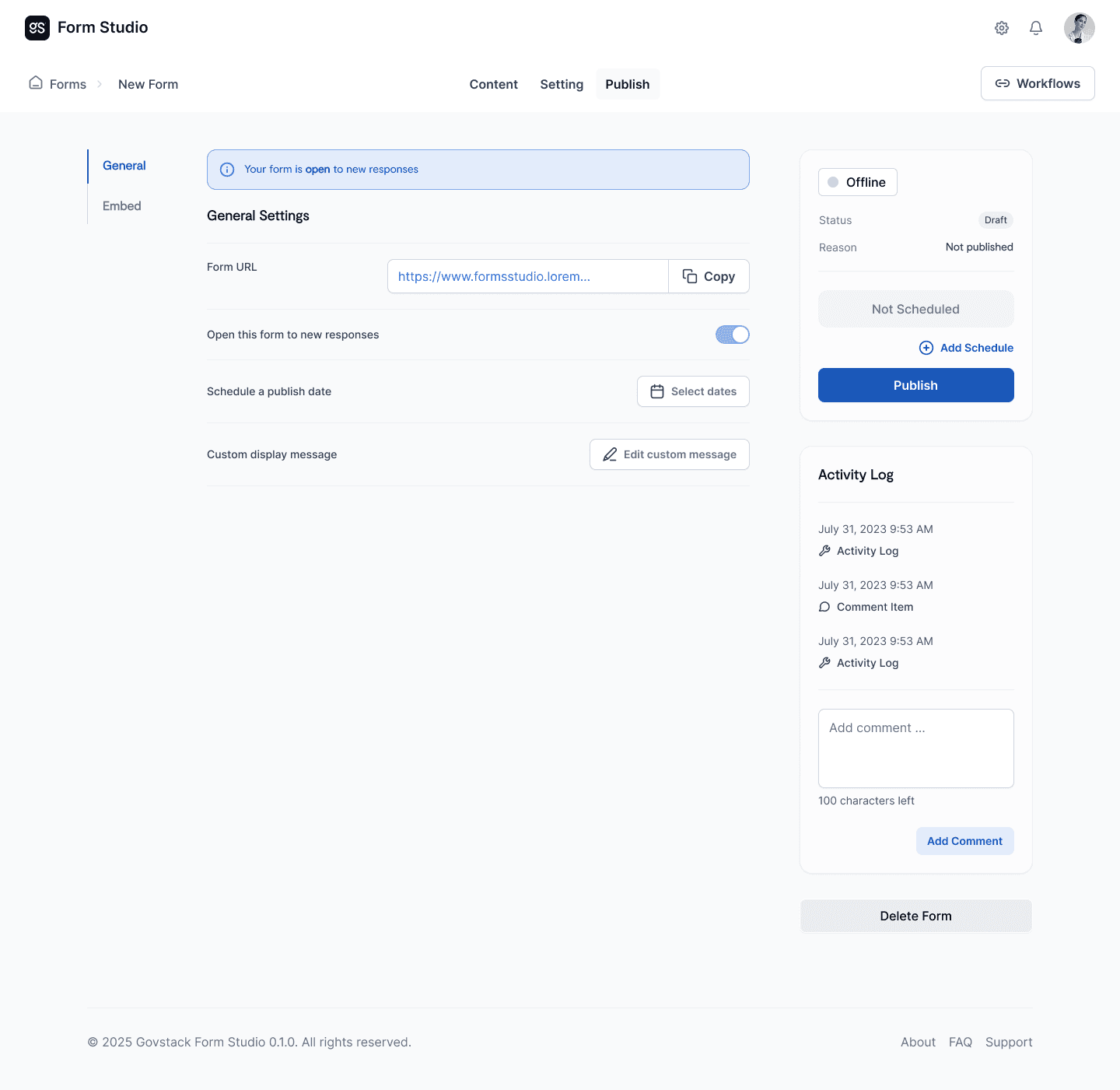
Status, availability, scheduling, and activity were brought together as one operational view.


Decision 01
Keep payment rules separate from form logic.

SurveyJS already handled question branching, and we could technically have used the same logic to calculate fees. But that would make payment rules difficult to find and manage. Changing one question could affect a charge somewhere else, and an admin would have to inspect a condition tree just to understand why someone was charged a certain amount.

So I separated the two:

SurveyJS would control what applicants see and answer.
Forms Studio would control how money is calculated.


Decision Test

Could an admin explain the final charge without reading a condition tree?

Could one fee be changed without breaking unrelated questions?

Could the same type of fee be reused across different municipal services?

KEPT IN survey js

Question & Resnponse Logic

What the applicant sees and answers.

field visibility

branching

conditional questions

moved to form studio

Financial Calulation Logic

How money is determined. Owned separately.

fee configuration

custom logic

external lookup

Fee Item
Complex pricing became a composition of visible rules.

I designed each charge as a reusable Fee Item. Each item did one thing: select a rate tier, add a surcharge, apply a time-based fee, multiply by quantity, collect a deposit, or calculate tax. Admins could combine them to match how a service actually charged people, instead of building everything into one long and fragile formula.

TIER / OPTION

TIER / OPTION

Event type

Private $150 · Commercial $300 · Non-profit $80

CONDITIONAL

Resident surcharge

Resident +$0 · Non-resident +20%

TIME-BASED

Late booking

< 7 days out +$50 rush fee

PER UNIT / QTY

Add-ons

AV $40 · Cleaning $60 · Security $30/hr

FLAT · REFUNDABLE

Security deposit

$200 — no tax · invoiced after approval

TAX RULE

HST 13%

Applies to base + rental + add-ons · not deposit
One community hall rental, six visible fee items. Each rule can be configured, reviewed, and changed independently.

BEFORE

IF event = commercial

AND resident = false

AND days < 7

THEN base×1.2 + 50

… + addons?

… + tax? (not deposit)

ELSE IF …

↳ fragile, cascading

AFTER

Event type · tier

$300

Resident surcharge

+20%

Late booking

+$50

Add-ons · per unit

$140

HST · scoped rule

13%

Deposit · refundable

$200

Before, the final amount depended on a chain of hidden conditions. After, every charge was named, ordered, and inspectable.


TRADE-OFF
The new model added slightly more setup for simple forms. In return, complex pricing became easier to review, safer to change, and more predictable across the product.
DECISION 02
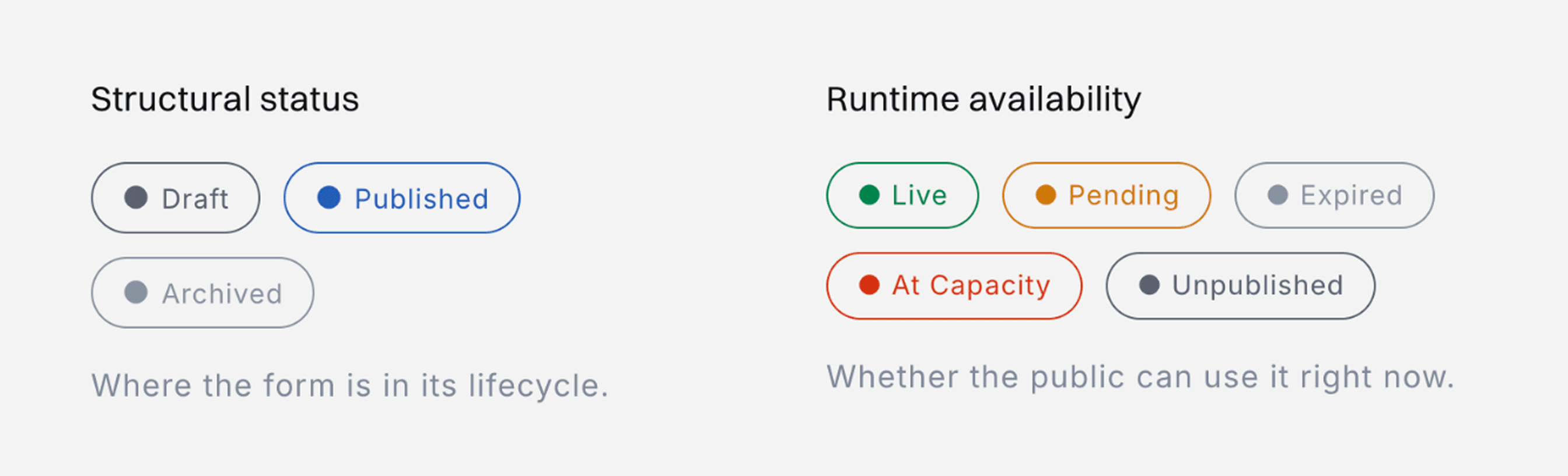
Published did not always mean open to the public.

Published was being used to mean two different things: where the form was in its lifecycle and whether residents could access it right now. But a published form could still be scheduled for later, limited to certain users, at capacity, or past its closing date.

I separated form status from public availability and showed both. Status tells staff where the form is in its lifecycle. Availability tells them whether residents can use it now (and if not, why not).


I mapped the publish and availability scenarios, then defined the reason, permitted actions, and recovery path for each state. This allowed the interface to explain scheduled, restricted, full, expired, unpublished, and archived conditions without overloading a single status.

Image
Image
Image
Image
Image
Image

Before, the final amount depended on a chain of hidden conditions. After, every charge was named, ordered, and inspectable.


TRADE-OFF
The new model added slightly more setup for simple forms. In return, complex pricing became easier to review, safer to change, and more predictable across the product.
Navigation now follows the work being done.

Before publication, the sequence is:

Content → Settings → Publish

After publication, the work changes:

Share → Results

The primary action changes with the form's state, while destructive or uncommon actions move out of the main path. This reduces the chance of an accidental transition without hiding the actions administrators still need.




TRADE-OFF
The system introduced more named states than a single toggle but fewer surprises. In a high-consequence workflow, visible complexity is safer than hidden complexity.
OUTCOME
The redesign gave the team an operating model, not just new screens.

The final handoff included around 150 high-fidelity screens covering navigation, statuses, permissions, configuration, and recovery. More importantly, they were all built from the same lifecycle and payment models. This gave product and engineering a consistent way to discuss edge cases before they reached development.

Publishing was no longer treated as one button, and payment was no longer buried in a condition tree. Each had a structure the team could understand, explain, and extend.

WHAT I CAN VALIDATE

The project moved into implementation after my handoff, but I left the company before its public release. I cannot claim production results or user metrics I did not measure. What I can validate is the design delivered: form states were made clearer, payment logic was separated from question branching, and new scenarios could be supported without adding another one-off rule.


WHAT I LEARNED
Good simplification doesn't remove complexity. It gives it a shape.

Publishing and payments looked like separate feature problems at first. But both kept coming back to the same questions: What state is this in? Who can make a change? What happens after they do? What could go wrong, and can it be reversed?

Once I started asking those questions consistently, individual design decisions became much easier. Public-sector software is complex because the policies and consequences behind it are complex. My job was not to hide that complexity, but to give it a clear structure, show the right information at the right time, and help staff recover when something went wrong.


What I'd measure next

I would first test whether administrators can answer three questions without assistance: Is this form available to the public right now? Why or why not? What action will change that? I would then compare configuration errors and time-on-task across common payment scenarios, and track how often administrators need support to recover from an incorrect state.


One community hall rental, six visible fee items. Each rule can be configured, reviewed, and changed independently.

BEFORE

IF event = commercial

AND resident = false

AND days < 7

THEN base×1.2 + 50

… + addons?

… + tax? (not deposit)

ELSE IF …

↳ fragile, cascading

AFTER

Event type · tier

$300

Resident surcharge

+20%

Late booking

+$50

Add-ons · per unit

$140

HST · scoped rule

13%

Deposit · refundable

$200

design decision
Status, availability, scheduling, and activity were brought together as one operational view.


Decision 01
Keep payment rules separate from form logic.

SurveyJS already handled question branching, and we could technically have used the same logic to calculate fees. But that would make payment rules difficult to find and manage. Changing one question could affect a charge somewhere else, and an admin would have to inspect a condition tree just to understand why someone was charged a certain amount.

So I separated the two:

SurveyJS would control what applicants see and answer.
Forms Studio would control how money is calculated.


Decision Test

Could an admin explain the final charge without reading a condition tree?

Could one fee be changed without breaking unrelated questions?

Could the same type of fee be reused across different municipal services?